Project Creator Window#
Overview#
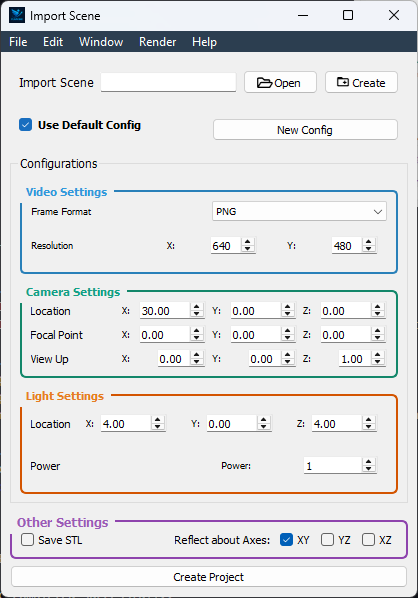
The Project Creator Window is the initial interface for creating a new project or loading an existing one. It allows you to set up your scene and configure render settings before diving into the animation process. This window is divided into two main sections: Scene Setup and Render Configuration.
—
Scene Setup#
Create New Scene Initialize a fresh .pkl scene from scratch.
Import Scene Load an existing .pkl scene file into the project.
—
Render Configuration#
Load Default Settings
Toggle “Use Default Config” to apply FlapKine’s recommended parameters automatically.
Individual parameters remain editable if you want to fine‑tune.
New Render Configuration
Select this option to start with all render parameters set to zero.
Manually adjust each field to craft a custom setup.
Note
The default settings are designed to provide a good starting point for most projects. However, you can customize the render settings to suit your specific needs. For more information on the available parameters and their effects, see Render Configuration for details.
—
Create Project#
Confirm your scene selection and render settings.
Click Create Project.
FlapKine will generate your project folder, write the config and data files, then open the Project Editor Window for further work.